
 EN
EN  UA
UA 
Computer Vision Software Development for Innovative Firms
Computer vision stopped being an emerging technology a while ago. For many companies, it is already part of everyday operations. Factories use it to spot defects before products leave the assembly line. Retailers track inventory and customer movement through in-store cameras. Logistics companies analyze packages and warehouse activity in real time. Hospitals process medical scans faster with AI-assisted imaging tools.
The idea sounds simple enough: teach software to interpret images and video the way people do. In practice, though, computer vision software development is rarely simple. Teams run into messy datasets, inconsistent lighting, hardware bottlenecks, model drift, and infrastructure costs that grow faster than expected once systems move into production.
What Computer Vision Does
Computer vision systems analyze images and video to extract information. The tech combines image processing (manipulating visual data), machine learning (training models to spot patterns), and algorithms that run the analysis in real time or batches.
Most current systems use deep learning, specifically convolutional neural networks. These process visual data through layers. Early layers detect edges and textures. Deeper layers identify specific objects or patterns.
Development is different from typical software work. Training data needs usually exceed initial estimates by a lot. A defect detection system might need 50,000+ labeled images before it works reliably. Data quality matters more than volume. Poorly labeled training sets produce unreliable models, no matter how many images you have.
Why Businesses Started Treating Computer Vision Seriously
A few years ago, building custom computer vision software required large research budgets and specialized AI teams. That changed once cloud GPUs, open-source frameworks, and pre-trained models became widely available.
Today, development teams can build production systems with tools like TensorFlow, PyTorch, OpenCV, and YOLO without starting from zero every time. Transfer learning alone cut months from many AI image recognition projects.
Business pressure also played a role. Companies want to automate repetitive visual tasks because manual review simply does not scale well. A person can inspect products, review surveillance footage, or monitor warehouse activity for only so long before fatigue becomes a factor. Software does not get tired, even if it still makes mistakes.
Several things pushed adoption forward:
- Cloud AI infrastructure became cheaper and easier to access
- Image annotation platforms have improved
- Pre-trained machine learning models became more reliable
- Edge hardware got faster and smaller
- Companies faced growing pressure to automate operational work
Where computer vision applications actually get used
A lot of AI discussions stay abstract. Computer vision is easier to understand because the use cases are concrete. You can usually point a camera at a process and immediately see where automation might help.
Manufacturing and industrial automation
Manufacturing remains one of the biggest areas for computer vision solutions. Visual inspection systems can detect defects faster and more consistently than manual checks, especially in high-volume production environments.
A typical workflow looks something like this:
- 1. Capture images from the production line
- 2. Label acceptable and defective products
- 3. Train detection or classification models
- 4. Deploy the models near production equipment
- 5. Monitor errors and retrain when accuracy drops
These systems can identify scratches, missing components, incorrect assembly positions, or packaging problems within milliseconds. What matters in factories is not always model sophistication. Speed and reliability usually matter more. Many firms prefer lightweight models that run locally on edge devices because sending every video frame to the cloud creates latency and bandwidth problems fast.
Healthcare and medical imaging
Healthcare companies increasingly use machine learning for computer vision to analyze X-rays, CT scans, MRI images, and pathology slides. The goal is usually to reduce review time and help doctors spot patterns they might otherwise miss after hours of repetitive analysis.
Healthcare projects are also stricter than most industries. Development teams need to think about:
- Annotation accuracy
- Regulatory compliance
- Data privacy
- Explainability
- Clinical validation
A model that performs well in testing still may not be usable in practice if clinicians cannot understand how predictions are generated. That becomes a serious issue in regulated environments.
Retail and customer analytics
Retail companies use computer vision applications for everything from shelf monitoring to automated checkout systems.
Some common examples include: queue detection, product recognition, inventory tracking, store heatmaps, customer movement analysis, and more.
Video analytics platforms can process huge amounts of footage without forcing staff to manually review recordings. For large retail chains, that matters because even small operational inefficiencies become expensive at scale.
Many retailers now combine computer vision with IoT systems and cloud analytics tools so multiple locations can share centralized reporting.
How Development Works
People tend to focus on the neural network itself. In reality, most projects succeed or fail because of data quality and deployment decisions.
Data collection and annotation
Bad data quietly destroys computer vision projects. If images are labeled inconsistently, the model learns inconsistent patterns. No architecture fixes that problem. Most teams spend a surprising amount of time on image collection, data cleaning, annotation, dataset balancing, and augmentation.
Anomaly detection creates another issue because defective examples are naturally rare. A production line may generate thousands of normal products before one defective unit appears. That imbalance makes training harder.
Teams often use augmentation techniques like cropping, rotation, scaling, brightness adjustment, or synthetic image generation to compensate. Some industries also require domain experts during annotation. Medical imaging is the obvious example. A random contractor cannot reliably label pathology scans.
Model training and selection
Different tasks require different model architectures. There is no universal system that works equally well everywhere.
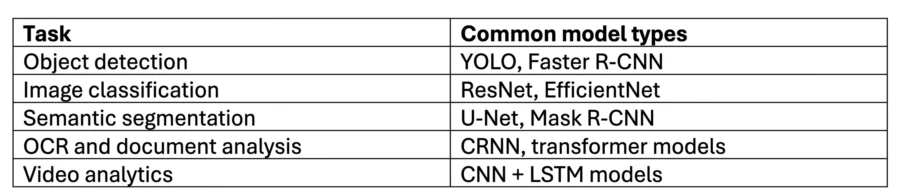
Most teams start with transfer learning instead of training models entirely from scratch. It saves time, reduces GPU costs, and usually delivers solid results faster.
Training itself becomes an iterative process. Engineers adjust hyperparameters, improve datasets, measure precision and recall, then repeat the process again. Sometimes the bottleneck is the model. Sometimes the bottleneck turns out to be the camera hardware.
Deployment becomes its own engineering problem
Getting a model to work in a notebook is one thing. Keeping it stable in production is another. Deployment strategy depends on latency requirements, connectivity, and infrastructure constraints.
Cloud processing
Cloud infrastructure works well for centralized analytics, multi-location systems, and large-scale storage.
Edge computing
Edge deployments are common in manufacturing, autonomous systems, and real-time video processing. The biggest advantage is lower latency. Devices can process visual information locally without waiting for cloud responses.
Hybrid infrastructure
A lot of firms end up combining both approaches. Real-time inference may run on edge hardware, while retraining and analytics remain in the cloud. That setup usually balances speed with scalability reasonably well.
Conclusion
Companies already use computer vision solutions to automate inspections, analyze video streams, improve diagnostics, and reduce repetitive manual work across multiple industries. The difficult part is building a system that keeps working after deployment, under real operating conditions, with real infrastructure limitations. That usually comes down to data quality, deployment strategy, maintenance planning, and realistic expectations about what AI image recognition systems can and cannot do well.