An AI assistant for blind and low-vision people: Meet Provodyr
There’s a particular kind of friction that sighted people rarely notice: the moment before you cross a street, before you find the pharmacy counter, before you figure out which floor an elevator has stopped on. For blind and low-vision people, that friction shows dozens of times a day, and it usually has to be solved with a cane, a memorized route, or a stranger’s help.
Provodyr is a mobile app built by Agiliway that aims to close some of those gaps. It turns a phone’s camera, microphone, compass, and barometer into a running narration of the world, spoken aloud, on request, in plain language. The same interaction also works through smart glasses, for people who’d rather keep their hands free. No menus to hunt through, no screen to squint at. Just a question, and an answer.
Ask, and get an answer, not a menu
At the center of Provodyr is a simple interaction: point the camera, ask a question out loud, and hear a response. Someone might ask what’s on a restaurant menu, whether a door is push or pull, or what color a shirt is. The assistant can also follow up because it remembers the last few exchanges; a second question like “and what does the sign next to it say?” doesn’t require starting over.
It’s launched with a button or a spoken wake word, “Assistant”. Siri Shortcuts let people trigger common actions without opening the app at all. That’s especially useful when your hands are already full, or the phone is still in a pocket or, with smart glasses, when you don’t want to reach for a phone in the first place.
The AI doesn’t have to live entirely in the cloud, either. Provodyr can route requests to a cloud model when there’s a connection or fall back to an on-device model when there isn’t. The app leaves this distinction to the user, not the network. Every request and photo can be saved to a personal history, so you don’t have to ask the same question again later. And because the assistant will repeat a question back before answering, it’s easy to catch a misheard word before the answer arrives.
Directions on the face of a clock
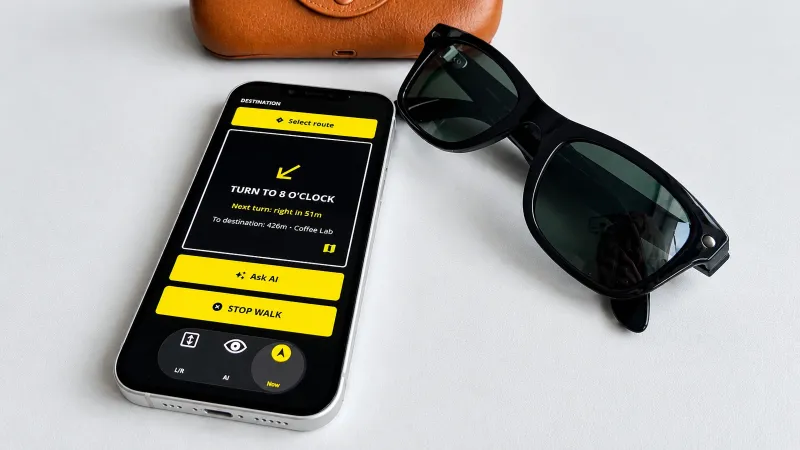
Provodyr’s second mode handles getting from one place to another. Search by voice or name, or browse nearby categories like pharmacies and transit stops. Walking directions start right away and update automatically if you lose the route.
Rather than degrees or compass headings, Provodyr describes direction the way people already think about it: as positions on a clock face. “Continue to two o’clock” is a more intuitive instruction than “turn 60 degrees right.” It also skips the kind of spatial translation that abstract bearings require. If someone drifts significantly off the planned path, the route recalculates without being asked.
Navigation stays conversational, too. A person can ask “where am I?” or “how much farther?” mid-walk, without interrupting the guidance already in progress. Frequently walked routes are saved for one-tap repeats.
Where GPS gives up, a barometer takes over
Outdoor navigation is largely a solved problem for assistive technology. Indoors, and specifically inside elevators, it mostly isn’t. GPS doesn’t reach a shaft, and floor buttons are often unlabeled in braille. Audible floor announcements are far from universal, too.
Provodyr’s third mode uses the phone’s barometric sensor to detect small changes in air pressure as an elevator moves. It converts that into a floor count, announced through voice, sound, or vibration. Buildings can be calibrated once and the profile saved to the cloud, so a return visit doesn’t require recalibration. The system also accounts for real-world quirks, like European-style ground floors numbered zero, skipped thirteenth floors, and uneven floor heights. Frequent trips, like lobby-to-ninth-floor, can be saved as one-tap presets or triggered through Siri.
Built to work when the network doesn’t
A theme runs underneath all three modes:
- Provodyr is designed not to fail when connectivity does. The wake word is recognized entirely on-device, so activating the assistant never depends on a signal.
- Images can be pre-processed locally before anything is sent out, cutting down both latency and data use.
- And when there’s no connection at all, e.g., in a basement, on a flight, or during an outage. In those cases, the on-device AI model, local speech recognition, and voice synthesis keep working on their own.
The app is also built to complement the accessibility tools people already rely on. Full VoiceOver and TalkBack support means Provodyr uses the same gestures and haptic feedback patterns as the rest of a person’s phone. Nobody has to learn a second interface. Logging is optional and adjustable, too, since not everyone wants a running log of their questions and photos: text only, text with images, or off entirely.
Built with blind users, not just for them
Provodyr’s design choices trace back to that same principle: clock-face directions instead of raw degrees, floor detection instead of assumed GPS coverage, and offline fallbacks instead of a hard dependency on connectivity. It’s built around how blind and low-vision people, including civilians and veterans, actually move through their day. That’s a deliberate contrast to designing from a general assumption of what accessibility should look like.
That’s also the direction the app is headed next. Provodyr is coming to iOS and Android, and the team is especially eager to hear from rehabilitation centers, veterans’ programs, and funds that work directly with blind and low-vision communities. Given the choice, they’d rather show someone the app than describe it.
The technology behind Provodyr isn’t limited to accessibility, either. Voice-first interaction, on-device computer vision, and AI that keeps working without a connection are useful far beyond navigation, and Agiliway’s team works on similar systems for companies in other industries. For anyone curious about how the app was built, or how comparable technology could fit into their own product, the team is open to that conversation.